
 Manage User Profile
 User Team Chat
 User Platform
Message
User Platform
Message  My Receipts
 Go To Dashboard
 Submit New Profile
 logout
 admin • 1 Dec 2025
8 Holiday Fundraising Strategies for Nonprofits, Clubs and PTO’s
Giving Tuesday is here, and the weeks that follow offer an especially meaningful window for

 New! Booostr Role Manager + Quick Demo Video
 New! Booostr Role Manager + Quick Demo Video
 We are incredibly excited to announce our latest update to Booostr. We officially have launched the ability to Manage Roles and create Custom Roles for your contacts! What does this mean? Now you can control which tools each role can access AND in addition – create any number of Custom Roles with their own tool […]

We are incredibly excited to announce our latest update to Booostr. We officially have launched the ability to Manage Roles and create Custom Roles for your contacts! What does this mean? Now you can control which tools each role can access AND in addition – create any number of Custom Roles with their own tool access that your organization needs!
While this may sound like a technical update (it is), this update is also a game-changer in how you can manage your booster club, PTO or small nonprofit on Booostr! Let’s walk through what this means for small organizations.
First, we already know you have a small team of volunteers helping operate your booster club, PTO or small nonprofit. Keeping that in mind, you also probably want to be careful about who has access to which tool. And, even beyond that – some of your volunteers may only want access to specific tools in order to streamline their work flow. With Booostr Role Manager you now have complete control over this!
Second, let’s talk about efficiencies. Running a volunteer organization like a Booster Club, PTO or Small Nonprofit is a part time in your spare time gig. The last thing you want to do is spend your time troubleshooting why your volunteers, leadership or supporters can’t locate the tool they need. Furthermore your volunteers, leadership and supporters will benefit by only having access to the specific tools they need! By managing access and roles – you can ensure that the people that need access to specific Booostr Tools will have it and easily be able to jump right in. The net gain is a more efficient organization that can make a BIGGER impact!
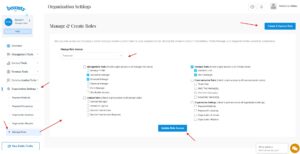
Booostr Role Manager is designed to be simple to use… An almost a set it and forget it system! We built the tool to be flexible in allowing Profile Managers the ability to update existing system default role tool access (for those that want to use our default roles), and/or create your own custom roles for your organization. Let’s walk through how to access Role Manager.
First, you will need to login to your Booostr account and navigate to your organization’s dashboard.
Second, in the organization Left Side navigation – expand the Organization Settings tool group
Third, click on the bottom option labeled “Manage Roles”
Now you are in your Booostr Role Manager for your organization. Here you will see a default page that will allow your booster club, PTO or Small Nonprofit to either update an existing role OR create a NEW custom role.
To update an existing role, simply choose a role from the drop down menu to edit. Once you select a role, you can then choose which tools that role will have access to. When you are done, simply click the Update Role Access button to complete the update.
Creating a new Custom Role is just as easy, but with an extra step. First you need to click on Create A Custom Role button. This will open a pop-up window where you will need to give your role a name and save it. Once you save it, the role is created. However, the role – while created, has not tool access applied to it yet. By default all new Custom Roles have the same access as the supporter role level (essentially no access). The Second step to set up your custom role, is selecting the newly created custom role from the drop down, which will display the same options for tool access as editing an existing role. Simply choose which tools you want your custom role to have access to and click the Update Role Access button to complete the update!
To help you get started managing and creating custom roles, we put together a quick demo video:
No matter the size of your booster club, school PTO or small nonprofit – managing your volunteers is critical. This doesn’t just pertain to events or tasks, but also the tools to help them accomplish their tasks easier. With Booostr’s platform of tools – now INCLUDING Booostr Role Manager, your best in class all-in-one nonprofit software just became that much more handier!
Not familiar with Booostr? First time here? Take a look at all of our Tools here and get started for FREE here.
Want to check out a demo of the system? You can sign up for that here!
Finally – if your booster club, school PTO or small nonprofit is a 501c3 organization – you can get an entire YEAR of Booostr PRO for FREE! Find out more here.
Giving Tuesday is here, and the weeks that follow offer an especially meaningful window for…
Well it’s Thanksgiving week and here we are, still pushing out updates! We are so…
One of the earliest and most basic features of Booostr is the FREE Club or…

Giving Tuesday is here, and the weeks that follow offer an especially meaningful window for

Well it’s Thanksgiving week and here we are, still pushing out updates! We are so

One of the earliest and most basic features of Booostr is the FREE Club or