
 Manage User Profile
 User Team Chat
 User Platform
Message
 My Receipts
 Go To Dashboard
 Submit New Profile
 logout
admin • 19 Nov 2026
Nonprofit Tax Preparation Worksheets: New IRS 990 Tools from Booostr
Tax season can be a stressful time for small nonprofits. Between gathering financial records, organizing

 Nonprofit Tax Preparation Worksheets: New IRS 990 Tools from Booostr
 Nonprofit Tax Preparation Worksheets: New IRS 990 Tools from Booostr
Tax season can be a stressful time for small nonprofits. Between gathering financial records, organizing income and expenses, tracking down organizational information, and preparing annual IRS filings, even a relatively straightforward return can turn into a time-consuming project. For volunteer treasurers and small nonprofit leaders who are already wearing multiple hats, that’s a lot of […]

Tax season can be a stressful time for small nonprofits. Between gathering financial records, organizing income and expenses, tracking down organizational information, and preparing annual IRS filings, even a relatively straightforward return can turn into a time-consuming project. For volunteer treasurers and small nonprofit leaders who are already wearing multiple hats, that’s a lot of extra work.
That’s why we’re excited to introduce a new feature in Booostr Financial Manager: IRS 990 Tax Preparation Worksheets!
Organizations can now generate worksheets to help prepare their annual IRS reporting directly from Booostr, using financial records and organization profile information already stored in their account. Instead of starting with a blank spreadsheet or manually gathering information from multiple sources, Booostr does much of the initial organizing for you.
These worksheets are designed to help your organization review, organize, and export the information needed for tax preparation. (note: Booostr does not prepare, file, or submit your organization’s tax return to the IRS). Think of it as a head start on getting your information organized and ready for your tax preparer.
It’s another way we’re making financial management easier for the small nonprofits and booster clubs that need it most.
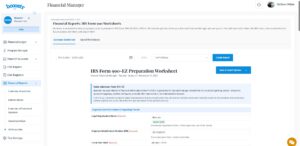
Preparing your nonprofit’s annual IRS reporting starts with having the right information in one place. Booostr Financial Manager already helps organizations track their income, expenses, transactions, and financial history. Now, that information can be used to help prepare annual IRS reporting worksheets.
The new feature supports all three major nonprofit filing types:
Whether your organization needs information for a full Form 990, a 990-EZ, or a 990-N, Booostr helps bring relevant information together in one convenient place.
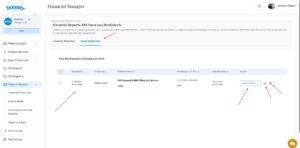
We’ve designed the process to be straightforward, even if you’re not an accounting expert.
1. Choose Your Tax Year and Filing Type
Select the year you’re preparing for and choose the appropriate filing type: Form 990, 990-EZ, or 990-N.
You aren’t limited to just the current year, either. If you’ve entered historical financial information into Booostr, you can generate worksheets for previous years. You can also prepare worksheets for future years as your financial records become available.
2. Generate Your Worksheets
Booostr automatically pulls relevant information from your Financial Manager records and your organization’s profile to populate the worksheets.
That means less time searching for financial figures, copying information between spreadsheets, and entering details that Booostr already has.
3. Review, Update, and Regenerate
Your organization remains in control. Review the information Booostr has populated, confirm what’s correct, and make any necessary adjustments. Once you’ve made updates, you can regenerate the worksheet to reflect the changes.
4. Save and Export
Save your worksheets in Booostr so you can return to them when needed. You can also export your information in:
Share your worksheets with your treasurer, board members, accountant, or tax preparer. Having your financial information organized and readily available can make the next steps of preparing your organization’s tax return much easier.
Your worksheets are a preparation resource, not a completed tax return. Your organization or its tax professional is responsible for reviewing the information, completing any required forms, and filing them with the IRS.
Along with the new tax worksheets, we’ve introduced additional IRS reporting classifications within Booostr Financial Manager.
These classifications help organizations organize revenue and expenses according to IRS reporting categories, making it easier to prepare the information needed for annual reporting.
IRS Revenue Categories
Organize income into categories such as contributions, government grants, membership dues, program service revenue, fundraising income, investment income, and other revenue.
IRS Expense Categories
Classify expenses according to the reporting categories used by the IRS, helping organize everything from compensation and benefits to supplies, occupancy, professional fees, and other operating expenses.
IRS Functional Expense Classifications
Identify how expenses are used by your organization:
You can establish default classifications at the Chart of Accounts level, allowing Booostr to automatically apply them to associated transactions. When a transaction needs a different classification, you can override the default without changing the account’s settings.
Together, these improvements help keep your financial records organized and make preparing IRS reporting worksheets more efficient.
Small nonprofits have different needs than large organizations with dedicated accounting departments and paid finance staff. Often, financial management falls to a volunteer treasurer who may be learning the ropes, managing a full-time job, and trying to keep everything organized between meetings.
We believe financial software should make that job easier, not add another layer of complexity.
By connecting IRS reporting worksheets directly to your organization’s financial records and profile information, Booostr helps eliminate repetitive work and makes important financial information easier to access.
And because your organization’s financial history stays in Booostr, new treasurers and leadership teams can pick up where the previous volunteers left off instead of starting over every year.
A little less spreadsheet juggling. A little less tax-time stress. And a lot more time for the work that matters.
Booostr’s IRS 990 worksheets are designed to help small nonprofits organize their financial and organizational information for tax preparation. They are not official IRS forms, tax advice, or an electronic filing service. Booostr does not prepare, certify, or submit tax returns to the IRS.
Organizations should review their information and work with a qualified tax professional when needed to ensure their returns are accurate and filed according to IRS requirements.
If your organization is still managing its finances across disconnected spreadsheets and software, this is a great time to take a look at what Booostr can do.
Booostr brings financial management together with the tools small nonprofits use every day, helping keep transactions, supporter information, fundraising activity, and organizational records connected.
And here’s something we think you’ll really like:
Booostr has $0 subscription fees.
No monthly subscription. No annual subscription. No credit card required to get started. You can use one tool or the entire connected platform, with support to help your organization get up and running.
Ready to make financial management and tax preparation a little easier?
Get started with Booostr or schedule a demo to see how it works.
More money for your mission. Less money for software. Sounds like a pretty good way to start the year!
Tax season can be a stressful time for small nonprofits. Between gathering financial records, organizing…
Keeping your nonprofit’s documents organized shouldn’t be complicated, and finding a place to store and…
If your booster club, PTO, or nonprofit isn’t actively seeking business sponsors, you’re leaving money…

Tax season can be a stressful time for small nonprofits. Between gathering financial records, organizing

Keeping your nonprofit’s documents organized shouldn’t be complicated, and finding a place to store and

If your booster club, PTO, or nonprofit isn’t actively seeking business sponsors, you’re leaving money